CrowPanel ESP32 4.2inch E-paper HMI Display with 400*300 Resolution, Black/White Color Driven By SPI Interface
製作サンプル
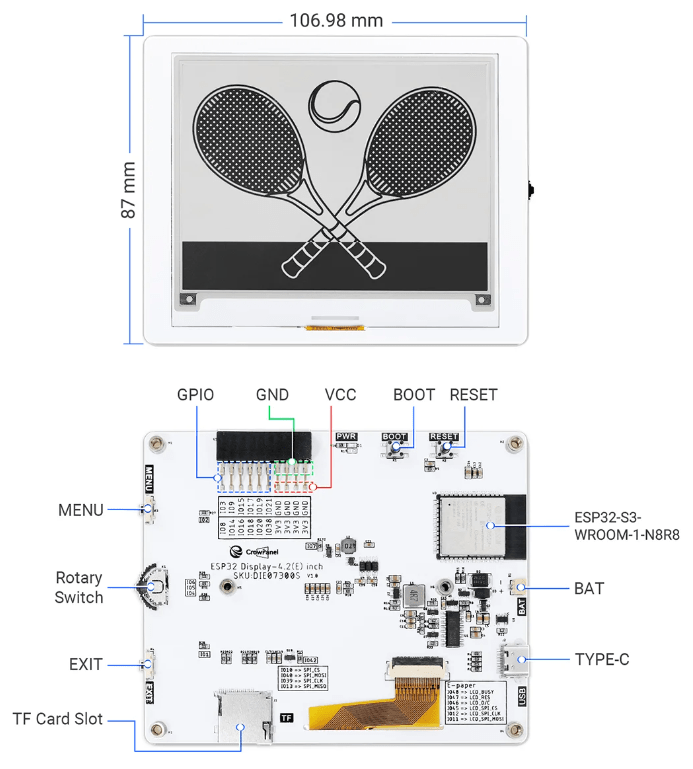
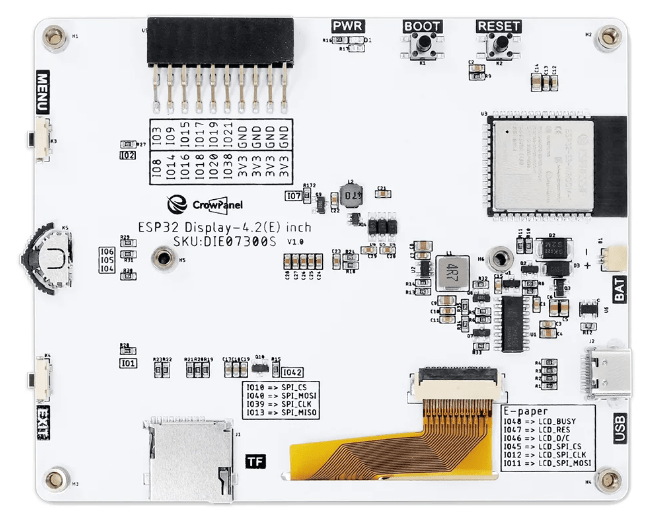
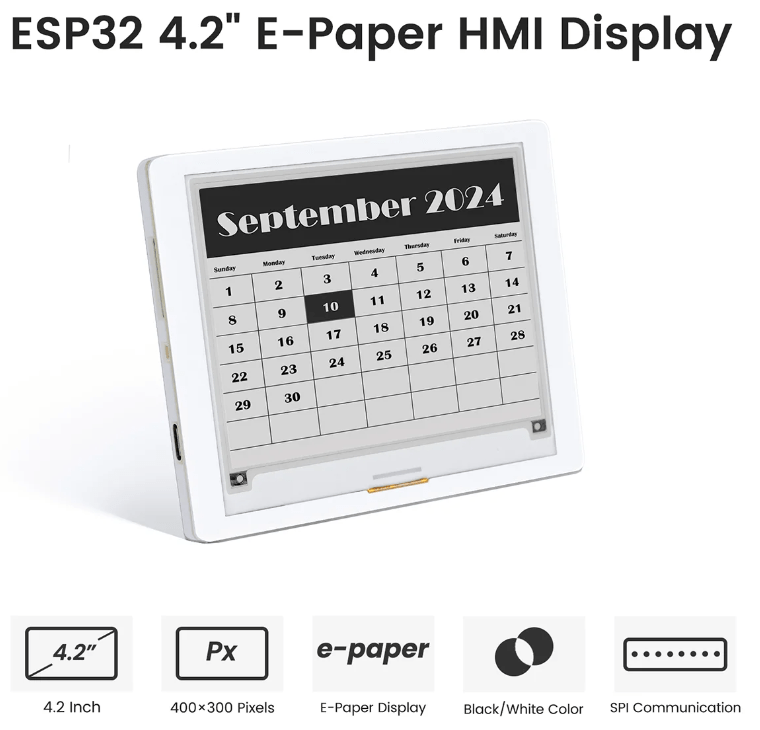
[4.2-inch E-Paper display] 400*300 resolution, using ESP32-S3 as the main control, powerful performance.
[Ultra-low power consumption] It only consumes power when refreshing, extending battery life.
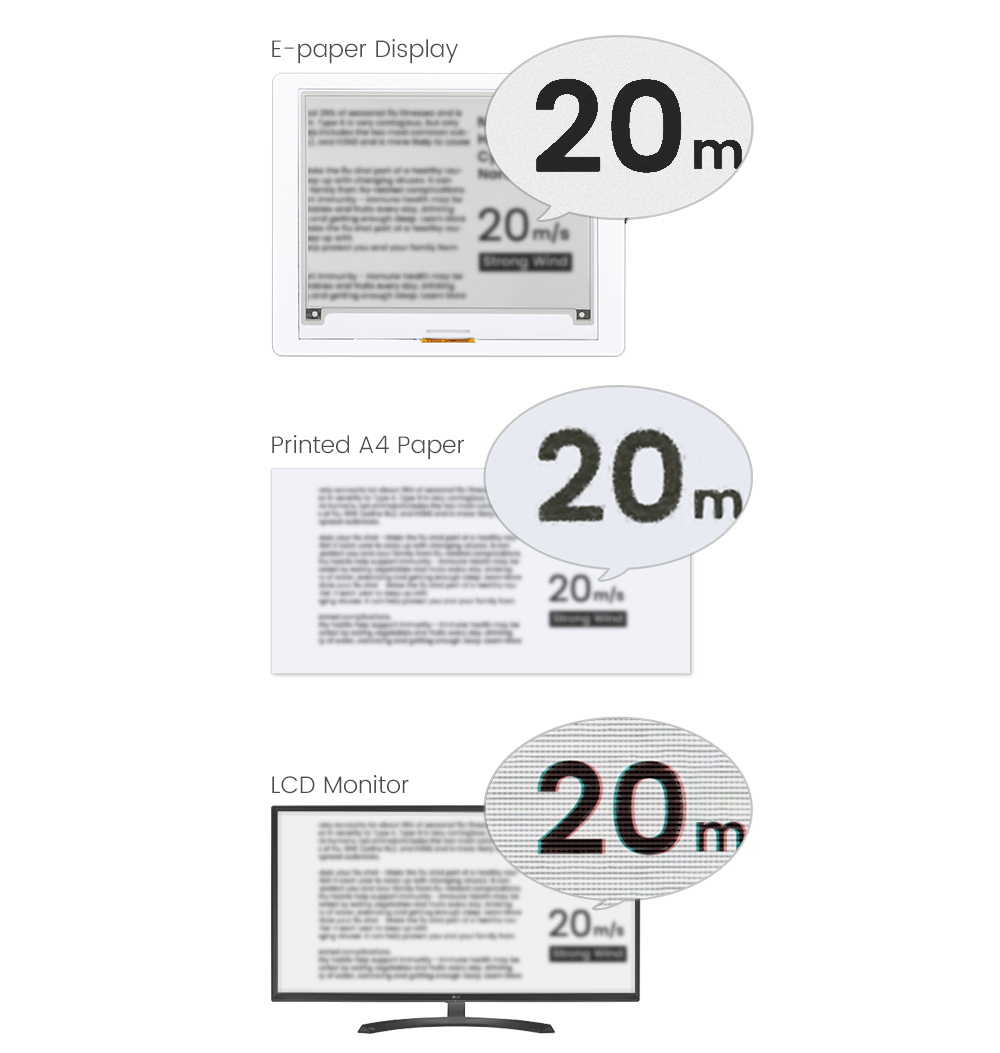
[Pure reflective mode] By reflecting ambient light instead of backlight to display content, it is clearly readable in direct sunlight.
[Power-off display retention] The content will not be lost even when there is no power.
[SPI and BAT interfaces] SPI interface for communication with other motherboards; onboard BAT interface, compatible with 2.2V~3.7V.
[❤️What you get] 24H Friendly Customer Service and 1 Year warranty.1x CrowPanel 4.2″ E-paper display,1x Charging Cable, 6x Tutorials and using demo.
CrowPanel 4.2″ ESP32 E-Paper Display
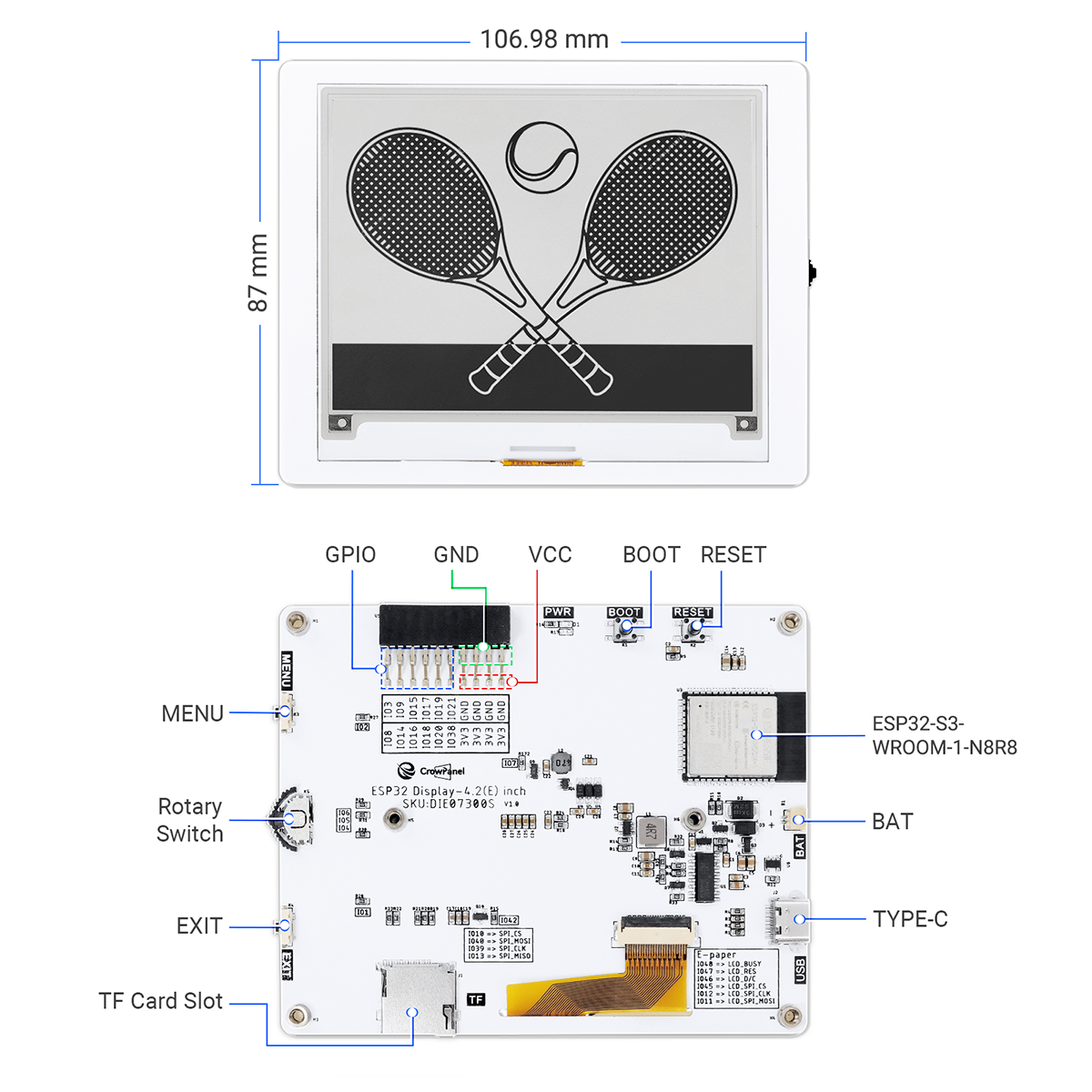
This CrowPanel ESP32 4.2” E-paper HMI display adopts advanced active matrix electrophoretic display technology and is equipped with a hard-coated anti-glare surface, which can keep the content clearly visible even in the sun, perfectly reproducing the appearance and reading experience of traditional paper. The built-in ESP32-S3 chip as the main control ensures powerful performance and fast and stable data transmission through the SPI interface. With a high resolution of 400*300, it provides a delicate display effect and adopts a classic black and white dual-color display to adapt to various application scenarios. It is also equipped with multiple interface and button designs, including TF card slot, BAT interface, UART0 interface, 2×10 pin GPIO interface, back button, home button and rotary switch, which is convenient for users to develop and operate. The white acrylic shell is not only beautiful but also protects the screen.
Based on the ESP32 chip, another highlight is its wide compatibility. It is compatible with the Arduino IDE development environment, simplifying the secondary development process. Also, its ultra-wide viewing angle design allows you to enjoy the same brilliant image from any angle. The ultra-low power consumption feature consumes only a small amount of power when refreshing, ensuring long-lasting battery life. Pure reflection mode means no backlight is required, and information remains clearly visible after power failure, without worrying about information loss.
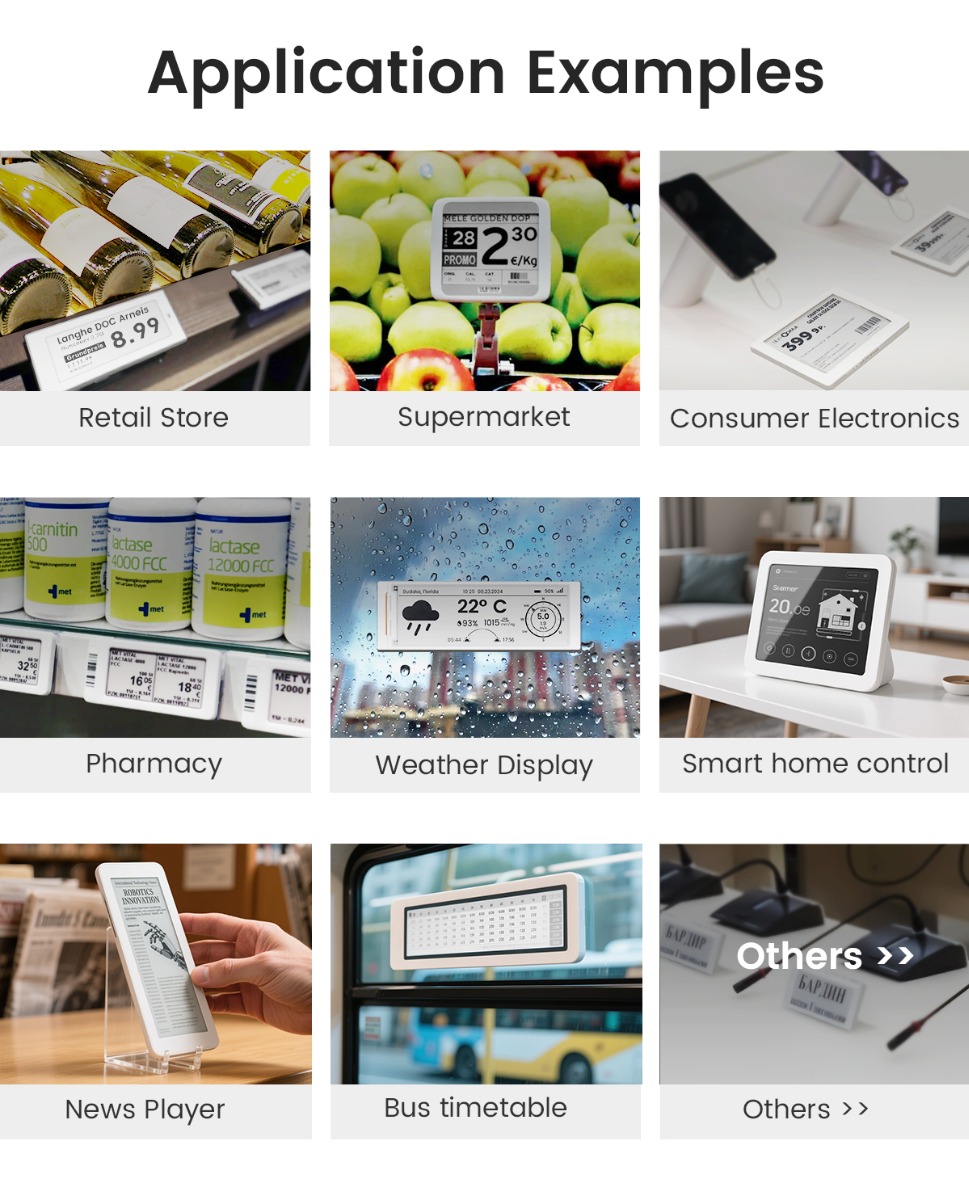
Due to its excellent characteristics such as low power consumption, high contrast and high reflectivity, this e-ink screen is widely used in shelf labels, price tags, badges, smart labels, smart home devices, e-readers, smart wearable devices and other portable devices, and is an ideal choice for various smart devices and applications.
Quick Click to where you are interested: #Feature, #Customer’s project, #Specification, #Different Size Comparison, #Documents, #Review.
Designed and manufactured by Elecrow, customized requests can be discussed(based on MOQ), you can contact us at service@elecrow.com.

Advantages of E-paper
Electronic paper displays can clearly display images/text under lighting or natural light, without backlight, with lower power consumption and longer life due to partial refresh. Because its effect is similar to that of paper, it is often used as an e-reader.
Feature
- CrowPanel 4.2-inch E-Paper display, 400*300 resolution, black and white, using SPI interface communication;
- ESP32-S3 as the main chip, frequency up to 240MHz;
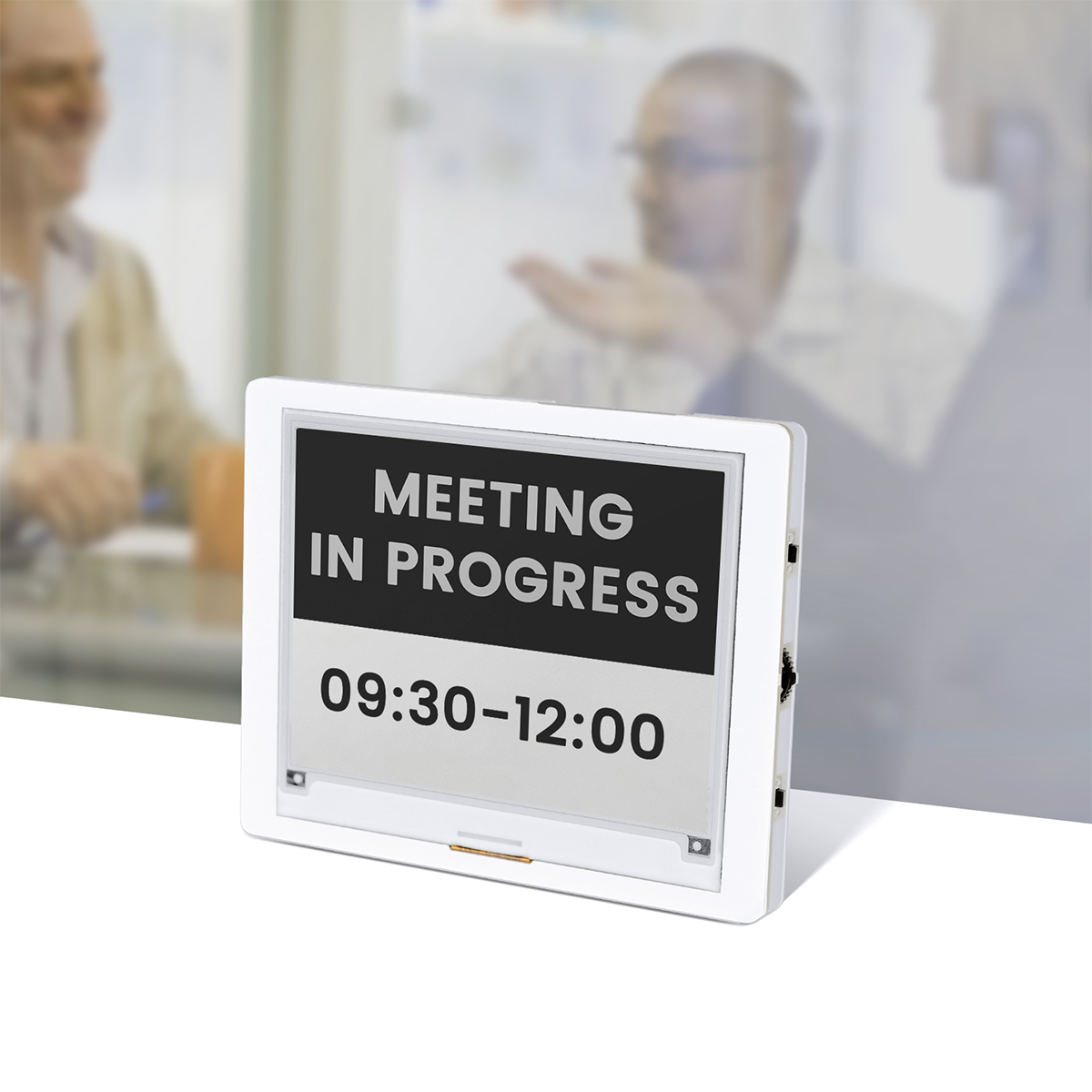
- Pure reflection mode, no backlight required, completely relying on light reflection to display content, and the displayed content will not be lost even if the power is off;
- Hard-coated anti-glare display surface, which can keep the content visible even under direct sunlight;
- High contrast and high reflectivity provide a clearer and more vivid visual experience;
- Ultra-low power consumption and partial refresh function, significantly saving energy and extending battery life;
- Support full viewing angle, clearly visible from any angle;
- Rich buttons and interfaces (such as GPIO interface, UART interface, home button, etc.) for easy development and operation;
- Equip with the Arduino IDE development environment for a smooth development experience.
Spotlight Projects: See How Customers Are Using This E-Paper Display
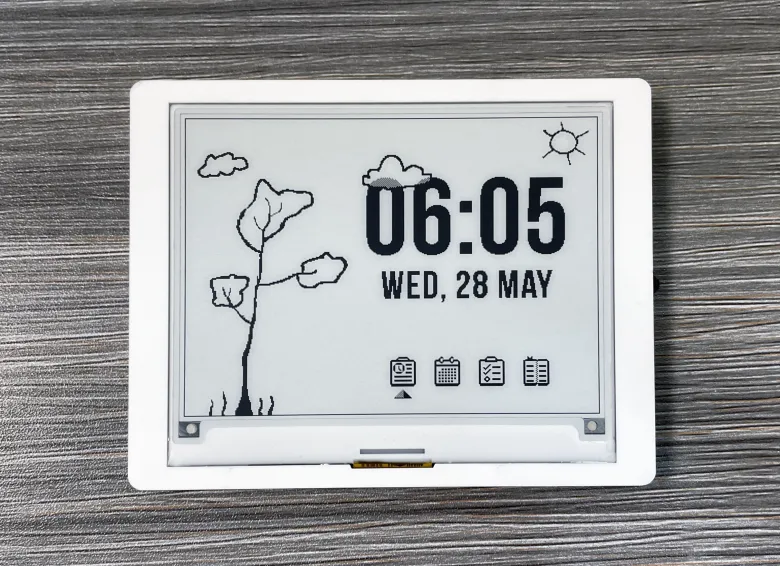


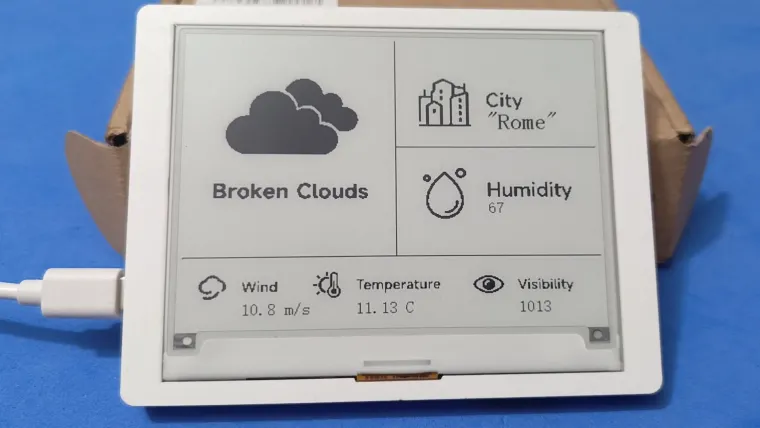
Where to use
- Electronic label: supermarket or shelf product information and price;
- E-book reader;
- Electronic business card: display the corresponding participant information;
- Smart home and other applications.
Specification
| Size | 4.2 inch |
| MCU | ESP32-S3-WROOM-1-N8R8, up to 240 MHz |
| Flash | 8 MB |
| PSRAM | 8 MB |
| WiFi | Support |
| Material | Active Matrix Electrophoretic Display (AM EPD) |
| Driver Chip | SSD1683 |
| Resolution | 400(H)*300(V) Pixel |
| Pixel pitch | 0.212*0.212 |
| Viewing Angle | Full Viewing Angle |
| Communication interface | 3-/4-wire SPI |
| Interface | UART0x1, BATx1(SH1.0-2P), GPIOx1, TF Card Slot x1 |
| Button | Dial Switchx1, Menu Buttonx1, Back Buttonx1, REST Buttonx1, BOOT Buttonx1 |
| Development Environment | Arduino IDE |
| Display Color | Black and white |
| Refresh Mode | Partial refresh (saves more power) |
| Display Operation Voltage | 2.2~3.7V |
| Case | White Acrylic Case |
| Operation Temperature | -0~50℃ |
| Storage Temperature | -25~70℃ |
| Active Area | 84.8(H)*63.6(L)(H*L) |
Different Size Comparison
| Size | 1.54inch | 2.13inch | 2.9inch | 3.7inch | 4.2inch | 5.79inch |
|---|---|---|---|---|---|---|
| Color | black, white | black, white | black, white | black, white | black, white | black, white |
| Chip | ESP32-S3 | ESP32-S3 | ESP32-S3-WROOM-1-N8R8 | ESP32-S3-WROOM-1-N8R8 | ESP32-S3-WROOM-1-N8R8 | ESP32-S3-WROOM-1-N8R8 |
| Flash | 8MB | 8MB | 8MB | 8MB | 8MB | 8MB |
| PSRAM | 8MB | 8MB | 8MB | 8MB | 8MB | 8MB |
| Driver Chip | SSD1680 | SSD1680Z | SSD1680Z | UC8253 | SSD1683 | SSD1683 |
| Resolution | 152*152 | 122*250 | 128×296 | 240*416 | 400*300 | 272*792 |
| Partial Refresh | Yes | Yes | Yes | Yes | Yes | Yes |
| Communication Interface | SPI | SPI | SPI | SPI | SPI | SPI |
| Interface | UART0x1, BATx1 | UART0x1, BATx1, GPIOx1 | UART0x1, BATx1, GPIOx1, TF Card x1 | UART0x1, BATx1, GPIOx1, TF Card x1 | UART0x1, BATx1, GPIOx1, TF Card Slot x1 | UART0x1, BATx1, GPIOx1, TF Card Slot x1 |
| Button | Dial Switchx1, Menu Buttonx1, Back Buttonx1, REST Buttonx1, BOOT Buttonx1 | Dial Switchx1, Menu Buttonx1, Back Buttonx1, REST Buttonx1, BOOT Buttonx1 | Dial Switchx1, Menu Buttonx1, Back Buttonx1, REST Buttonx1, BOOT Buttonx1 | Dial Switchx1, Menu Buttonx1, Back Buttonx1, REST Buttonx1, BOOT Buttonx1 | Dial Switchx1, Menu Buttonx1, Back Buttonx1, REST Buttonx1, BOOT Buttonx1 | Dial Switchx1, Menu Buttonx1, Back Buttonx1, REST Buttonx1, BOOT Buttonx1 |
| Active Area | 37.18(H)*48.32(L)(H*L) | 31.2(H)*63.19(L)(H*L) | 29.056(H)*66.896(L)(H*L) | 47.04(H)*81.54(L)(H*L) | 84.8(H)*63.6(L)(H*L) | 47.74(H)*139.00(L)(H*L) |
Wiki & External links
- Wiki of CrowPanel ESP32 4.2″ E-paper display
- SSD1683 Datasheet
- 3D File of CrowPanel ESP32 4.2″ E-paper display
- ESP32-S3-WROOM-1 Datasheet
- Schematic of CrowPanel ESP32 4.2″ E-paper display
- Post your tech questions in the forum
What do they say?
| An E-Ink Display with Controls for a Home Hub and a Really Useful Lapdock for easy KVM from Elecrow | ELECROW ESP32-S3 Displays!!!! Recommended Display for Makers! |
| Youtuber: Kit Betts-Masters | Youtuber: Hakista TV (Pinoy Hacker) |
商品ページ
基盤情報
=== ESP32情報 ===
チップモデル: ESP32-S3
チップリビジョン: 0
CPUコア数: 2
CPU周波数: 240 MHz
Flash容量: 8 MB
PSRAM容量: 0 MB
  void setup() {
  Serial.begin(115200);
  delay(1000);

  Serial.println("\n=== ESP32情報 ===");
  Serial.print("チップモデル: ");
  Serial.println(ESP.getChipModel());
  Serial.print("チップリビジョン: ");
  Serial.println(ESP.getChipRevision());
  Serial.print("CPUコア数: ");
  Serial.println(ESP.getChipCores());
  Serial.print("CPU周波数: ");
  Serial.print(ESP.getCpuFreqMHz());
  Serial.println(" MHz");
  Serial.print("Flash容量: ");
  Serial.print(ESP.getFlashChipSize() / (1024 * 1024));
  Serial.println(" MB");
  Serial.print("PSRAM容量: ");
  Serial.print(ESP.getPsramSize() / (1024 * 1024));
  Serial.println(" MB");
}
テストコード
表示テスト
/*
 * CrowPanel ESP32 4.2" E-paper - GxEPD2版
 * 基本的なテキスト表示サンプル

 *  CrowPanel ESP32 4.2インチ E-paperディスプレイは
 *  ESP32-S3-WROOM-1-N8R8を搭載しています
    ボード設定を変えてください。
 */

#include "GxEPD2_BW.h"

// ピン定義
#define PWR  7   // 電源制御ピン(重要!)
#define BUSY 48
#define RES  47
#define DC   46
#define CS   45

// ディスプレイオブジェクト作成
GxEPD2_BW<GxEPD2_420_GYE042A87, GxEPD2_420_GYE042A87::HEIGHT>
  epd(GxEPD2_420_GYE042A87(CS, DC, RES, BUSY));

// 電源制御関数(CrowPanel専用)
void epdPower(int state) {
  pinMode(PWR, OUTPUT);
  digitalWrite(PWR, state);
}

void setup() {
  Serial.begin(115200);
  Serial.println("CrowPanel E-paper 初期化中...");

  // ディスプレイ電源ON
  epdPower(HIGH);
  delay(100);

  // E-paper初期化
  epd.init(115200, true, 50, false);
  epd.setRotation(0);
  epd.setTextColor(GxEPD_BLACK);

  // 全画面更新モード
  epd.setFullWindow();
  epd.fillScreen(GxEPD_WHITE);

  // テキスト表示
  epd.setTextSize(3);
  epd.setCursor(80, 80);
  epd.println("CrowPanel");

  epd.setTextSize(2);
  epd.setCursor(50, 130);
  epd.println("ESP32 E-paper");

  epd.setTextSize(1);
  epd.setCursor(50, 180);
  epd.println("Resolution: 400x300");
  epd.setCursor(50, 200);
  epd.println("Driver: GxEPD2");
  epd.setCursor(50, 220);
  epd.println("Status: OK!");

  // 枠を描画
  epd.drawRect(0, 0, 400, 300, GxEPD_BLACK);

  // 画面更新(数秒かかります)
  Serial.println("画面更新中...");
  epd.display();

  // スリープモード
  epd.hibernate();

  Serial.println("初期化完了!");
}

void loop() {
  // E-paperは静的表示なので何もしない
  delay(1000);
}
部分更新テストコード
/*
 * E-paper 部分更新テスト
 * drawPaged()を使用 - 座標修正版
 */

#include "GxEPD2_BW.h"

// ピン定義
#define PWR  7
#define BUSY 48
#define RES  47
#define DC   46
#define CS   45

// ボタン定義
#define BTN_MENU    2
#define BTN_EXIT    1
#define ROT_UP      6
#define ROT_DOWN    4
#define ROT_CONF    5

GxEPD2_BW<GxEPD2_420_GYE042A87, GxEPD2_420_GYE042A87::HEIGHT>
  epd(GxEPD2_420_GYE042A87(CS, DC, RES, BUSY));

int counter = 0;

// 部分更新エリアの定義(グローバル座標)
const uint16_t BOX_X = 100;
const uint16_t BOX_Y = 130;
const uint16_t BOX_W = 200;
const uint16_t BOX_H = 60;

void epdPower(int state) {
  pinMode(PWR, OUTPUT);
  digitalWrite(PWR, state);
}

// フル画面描画用のコールバック
void drawFull(const void* pv) {
  epd.setFullWindow();
  epd.fillScreen(GxEPD_WHITE);
  epd.drawRect(10, 10, 380, 280, GxEPD_BLACK);

  epd.setTextColor(GxEPD_BLACK);
  epd.setTextSize(2);
  epd.setCursor(80, 30);
  epd.print("Partial Update Test");

  epd.setCursor(40, 100);
  epd.print("Counter:");

  // カウンター表示エリア
  epd.drawRect(BOX_X, BOX_Y, BOX_W, BOX_H, GxEPD_BLACK);
  epd.setTextSize(5);
  epd.setCursor(BOX_X + 40, BOX_Y + 15);
  epd.print(counter);

  epd.setTextSize(1);
  epd.setCursor(30, 220);
  epd.print("MENU/CONF: Partial | EXIT: Full refresh");
  epd.setCursor(30, 240);
  epd.print("ROT_UP: +10 | ROT_DOWN: -10");
}

// 部分更新用のコールバック(グローバル座標で描画)
void drawPartial(const void* pv) {
  epd.setPartialWindow(BOX_X, BOX_Y, BOX_W, BOX_H);

  // グローバル座標で描画
  epd.fillRect(BOX_X, BOX_Y, BOX_W, BOX_H, GxEPD_WHITE);
  epd.drawRect(BOX_X, BOX_Y, BOX_W, BOX_H, GxEPD_BLACK);
  epd.setTextColor(GxEPD_BLACK);
  epd.setTextSize(5);
  epd.setCursor(BOX_X + 40, BOX_Y + 15);
  epd.print(counter);
}

void setup() {
  Serial.begin(115200);

  pinMode(BTN_MENU, INPUT_PULLUP);
  pinMode(BTN_EXIT, INPUT_PULLUP);
  pinMode(ROT_UP, INPUT_PULLUP);
  pinMode(ROT_DOWN, INPUT_PULLUP);
  pinMode(ROT_CONF, INPUT_PULLUP);

  epdPower(HIGH);
  delay(100);

  epd.init(115200, true, 50, false);
  epd.setRotation(0);

  Serial.println("=== Partial Update Test ===");
  Serial.println("MENU/CONF: +1");
  Serial.println("ROT_UP: +10");
  Serial.println("ROT_DOWN: -10");
  Serial.println("EXIT: Full refresh");

  // 初回フル描画
  epd.drawPaged(drawFull, 0);
  epd.hibernate();

  Serial.println("Ready!");
}

void loop() {
  // MENU or CONF: +1
  if (digitalRead(BTN_MENU) == LOW || digitalRead(ROT_CONF) == LOW) {
    delay(150);
    counter++;
    if (counter > 9999) counter = 0;

    Serial.print("Partial: ");
    Serial.println(counter);

    epd.drawPaged(drawPartial, 0);
    epd.hibernate();

    delay(200);
  }

  // ROT_UP: +10
  if (digitalRead(ROT_UP) == LOW) {
    delay(150);
    counter += 10;
    if (counter > 9999) counter = 0;

    Serial.print("Partial: ");
    Serial.println(counter);

    epd.drawPaged(drawPartial, 0);
    epd.hibernate();

    delay(200);
  }

  // ROT_DOWN: -10
  if (digitalRead(ROT_DOWN) == LOW) {
    delay(150);
    counter -= 10;
    if (counter < 0) counter = 9999;

    Serial.print("Partial: ");
    Serial.println(counter);

    epd.drawPaged(drawPartial, 0);
    epd.hibernate();

    delay(200);
  }

  // EXIT: フルリフレッシュ
  if (digitalRead(BTN_EXIT) == LOW) {
    delay(150);

    Serial.println("Full refresh");

    epd.drawPaged(drawFull, 0);
    epd.hibernate();

    delay(200);
  }
}
DeepSleepからの復帰について
ESP32-S3で使えるRTC GPIO(deepSleepウェイクアップ対応)
| GPIO | RTC GPIO | 備考 |
|---|---|---|
| GPIO 0 | RTC_GPIO0 | Strappingピン(注意) |
| GPIO 1 | RTC_GPIO1 | ✅ BTN_EXIT |
| GPIO 2 | RTC_GPIO2 | ✅ BTN_MENU |
| GPIO 3 | RTC_GPIO3 | Strappingピン |
| GPIO 4〜18 | RTC_GPIO4〜18 | 使用可能 |
| GPIO 19〜20 | RTC_GPIO19〜20 | USB-JTAG用 |
| GPIO 21 | RTC_GPIO21 | 使用可能 |
| GPIO 26〜48 | なし | ❌ RTC非対応 |
良いニュースです!
CrowPanelのボタンピンは:
- BTN_MENU (GPIO 2) → RTC_GPIO2 ✅ 対応
- BTN_EXIT (GPIO 1) → RTC_GPIO1 ✅ 対応
両方ともRTC GPIOなので、deepSleep中のウェイクアップに使えます!
Strappingピン(ストラッピングピン)は、ESP32が起動する瞬間にチップの動作モードを決めるための特別なピンです。
ESP32の電源が入った瞬間(リセット直後)に、これらのピンの電圧(HIGHかLOW)を読み取って、起動モードを決定します。
ESP32-S3のStrappingピン
| GPIO | 役割 |
|---|---|
| GPIO 0 | 起動モード選択(通常実行 or ダウンロードモード) |
| GPIO 3 | JTAG関連 |
| GPIO 45 | 電圧設定(VDD_SPI) |
| GPIO 46 | ROM起動メッセージ出力設定 |
例:GPIO 0の動作
| 起動時の状態 | 結果 |
|---|---|
| HIGH(または浮き) | 通常起動(プログラム実行) |
| LOW | ダウンロードモード(書き込み待ち) |
CrowPanelでの影響
ボタンのピンを確認すると:
- BTN_MENU (GPIO 2) → Strappingピンではない ✅ 安全
- BTN_EXIT (GPIO 1) → Strappingピンではない ✅ 安全
なので、deepSleepのウェイクアップに使っても問題ありません。
もしStrappingピンをウェイクアップに使うと、ボタンを押しながら電源が入った場合に意図しないモード(ダウンロードモードなど)で起動してしまう可能性があります。CrowPanelの設計では、そのリスクは避けられています。